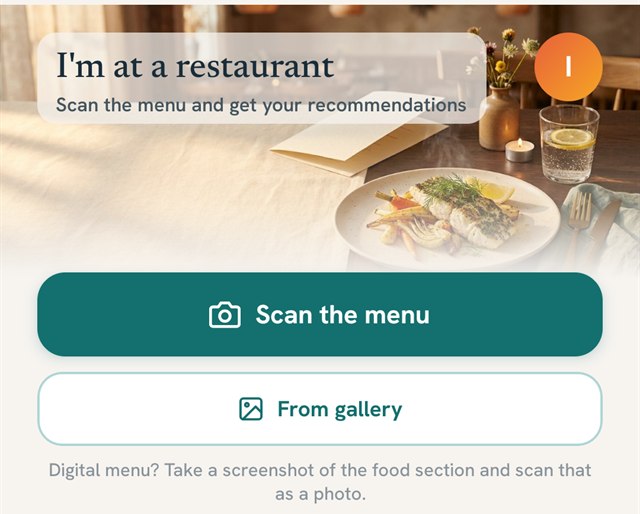
In short: you photograph the menu at the restaurant, and the app reads the dishes and tells you which ones are most likely to suit you — taking your profile’s tolerances into account — plus what to ask the kitchen to improve your odds. It isn’t a guarantee. It’s a short list instead of a long one.
How it works, step by step
- You open Menu and tap “Scan the menu”. Or you pick a photo you already took, from your gallery.
- The app reads the text in the photo and separates the dishes from everything else (prices, section titles, ads).
- Each dish is weighed against its likely ingredients and against your profile — not against a general list.
- You get “Your best choices”, each with one or two concrete notes for the kitchen.
- If you order one of them, a single tap puts it in your journal. Nothing to type.
At a trattoria, for instance, it put grilled chicken breast first, with the notes “ask for it cooked fresh, no marinade” and “ask for plain potatoes instead of the sauce”. Exactly the sentences I usually stumble through myself.
Why “the best choice” differs from person to person
Because tolerances aren’t identical. Foods start from the SIGHI list scores, but your profile sits on top: what you’ve marked as well tolerated, what you avoid entirely, what you’re in the middle of testing. Two people with the same diagnosis can get two different recommendations from the same menu — and that’s the point.
If you haven’t built your personal list yet, the article on my safe pantry is a good place to start.
What I ask the kitchen
Almost everything that matters in a restaurant is settled by three short questions:
- Is it cooked now, or reheated? The difference between a fresh portion and one that’s been sitting is the difference between a good evening and one with possible symptoms.
- Can I have it without the marinade / without the sauce? Sauces are where the things you can’t see in the description hide.
- Is the fish fresh or defrosted? I ask this one everywhere, every time.
You don’t have to explain your diagnosis. I wrote about that in how I read a restaurant menu — with the phrasings I use so ordering doesn’t turn into a medical lecture.
Where it gets things wrong — and what I do then
This is the part I want to say firmly, because it’s easy to believe that an app which “reads” the menu knows what’s on the plate. It doesn’t.
- Menus lie by omission. “Grilled chicken” can mean chicken that sat in a marinade for 12 hours. The description doesn’t say so, so the app can’t know either.
- Freshness doesn’t show up in text. The same dish on two different days isn’t the same thing.
- When it isn’t sure, it errs on the cautious side. It would rather not recommend something ambiguous than send you into a bad evening. Sometimes that means a shorter list than you’d like.
When something disagrees with me even though it was on the list, I tap the feedback button in the app and write down what happened. Not to complain — because those answers are what corrects the recommendations.
What if the menu is digital or behind a QR code?
You take a screenshot of the food section and scan it as an image, from your gallery. We deliberately dropped QR code reading: many of them lead to pages that load badly, while a plain screenshot works every time.
Only one thing matters about the photo: the text has to be readable. Two clear photos, section by section, beat one whole tilted one.
MyHistamate is on the App Store and Google Play
The app has come out of testing and can be installed from the App Store and Google Play.
The first seven days are free and complete, with no card.
It wasn’t the scanning itself that changed things for me. It was no longer being the last one at the table with the menu still in my hands.